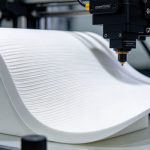
Horizontal artifacts along the Z-axis are among the most common and frustrating surface defects in FDM 3D printing. This article systematically distinguishes between the two primary types of Z-axis artifacts—Z-wobble and Z-banding—analyzes their causes across three dimensions (mechanical drive systems, extrusion systems, and slicing parameters), and provides a prioritized troubleshooting and repair workflow to help readers pinpoint the root cause and completely eliminate these artifacts.
I. Understanding the Artifacts: The Fundamental Difference Between Z-Wobble and Z-Banding
Many people lump all horizontal textures along the Z-axis under the terms “Z-banding” or “Z-wobble,” yet these two defects differ vastly in their causes and manifestations; confusing them can lead to incorrect troubleshooting.
Z-Wobble manifests as a regular, periodic, wave-like shift on the model’s outer wall, with the spacing of the pattern closely matching the rotation cycle of the lead screw. The root cause is the non-concentric rotation of the Z-axis lead screw, which induces a slight lateral (side-to-side) shift in the print head or gantry as it ascends. If you rotate the model in your hand and observe the wave pattern circling the model at a constant height, it is almost certainly a lead screw eccentricity issue.
Z-Banding, in contrast, appears as horizontal bands characterized by periodic variations in width, gloss, or texture, without any noticeable lateral swaying of the outer wall itself. Its causes are more diverse, potentially stemming from uneven Z-axis mechanical movement, fluctuations in extrusion volume, temperature instability, or inconsistent cooling.