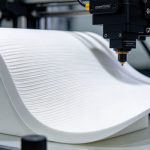
Choosing the right 3D Printer Filament is essential for reliable printing. Material selection, printer compatibility, troubleshooting, and storage all affect print quality. These eight questions help users choose and manage filament more effectively.
3D Printer Filament: Choosing the Right Material
How Do I Choose the Right 3D Printer Filament for My Project?
Choose a filament according to the part’s purpose and required performance.Choose a filament according to the part’s purpose and required performance.
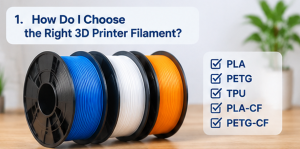
- PLA: Easy to print; suitable for decorative models, prototypes, and everyday objects.
- PETG: A practical option for functional parts requiring toughness and moisture resistance.
- TPU: Suitable for flexible parts such as grips, protective covers, and cushioning components.
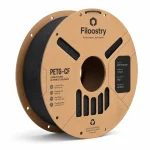
- PLA-CF and PETG-CF: Options for parts requiring greater stiffness and a matte finish.
Consider the operating environment, mechanical requirements, and your printer’s capabilities. Matching the material to the application can improve results and reduce waste.Consider the operating environment, mechanical requirements, and your printer’s capabilities. Matching the material to the application can improve results and reduce waste.
Is Your 3D Printer Compatible with Different Filament Materials?
Compatibility depends on your printer’s specifications. Before ordering, check that:Compatibility depends on your printer’s specifications. Before ordering, check that:
- Your machine supports FDM or FFF printing.
- The filament diameter (usually 1.75 mm or 2.85 mm) matches the extruder.
- The hotend reaches the material’s recommended nozzle temperature.The hotend reaches the material’s recommended nozzle temperature.
- The build plate suits the material.
- Abrasive filaments, such as carbon fiber composites, use a wear-resistant nozzle.
If unsure, consult your printer manufacturer’s specifications or contact our team.If unsure, consult your printer manufacturer’s specifications or contact our team.
What Filament Diameter Should I Choose for My 3D Printer?
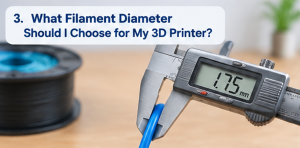 |
The most common diameters are 1.75 mm and 2.85 mm. Neither is universally better; choose the size specified for your printer. The wrong diameter can cause feeding issues or inconsistent extrusion. Also check diameter tolerance, as consistent dimensions help maintain stable feeding. |
3D Printer Filament Troubleshooting: Common Printing Problems
Why Does My Filament Keep Tangling During Printing?
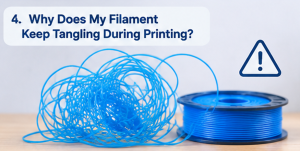
Tangling can interrupt feeding and cause a print to fail. It may happen when a loose filament end slips beneath another winding or the spool cannot rotate freely.
To prevent this, secure the filament end after removing the spool, avoid loose unwinding, check that the spool holder turns freely, and keep the filament path clear.
Why Is My Filament Not Sticking to the Build Plate?
Poor first-layer adhesion may result from an unlevel bed, incorrect nozzle distance, a dirty surface, or unsuitable settings.
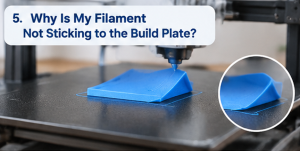 Try these steps:
- Level the build plate and adjust the Z-offset.
- Clean the surface to remove dust, grease, and residue.
- Check the recommended nozzle and bed temperatures.
- Reduce first-layer speed if needed.
A properly prepared build plate gives the print a stable foundation.
How Can I Reduce Stringing and Oozing During 3D Printing?
Stringing appears as thin strands between sections of a model. Common causes include high nozzle temperature, unsuitable retraction settings, and moisture in the filament.
To reduce it, adjust nozzle temperature within the recommended range, fine-tune retraction distance and speed, optimize slicer travel settings, and check whether the filament needs drying. Run a small stringing test and adjust settings gradually, as results vary by material and printer.
3D Printer Filament Storage and Daily Use
How Should I Store Opened 3D Printer Filament?
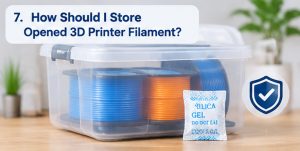 |
Protect opened 3D Printer Filament from moisture, dust, and heat. Return the spool to an airtight bag or sealed container with desiccant. Keep it away from sunlight and excessive heat, and secure the loose end to prevent tangling. For moisture-sensitive materials, use a dry storage box. If printing problems suggest moisture absorption, follow the manufacturer’s drying instructions. |
Can I Use Different Brands of Filament in the Same 3D Printer?
Usually, yes, if the filament specifications suit your printer. Brands may vary in formulation, diameter tolerance, and recommended settings. When changing brands, confirm the diameter, review the nozzle temperature, and update the slicer profile if needed. Run a small test print before a large project; filaments with the same material name may not use identical settings.
Need help choosing your next 3D printing material? Explore the 3D-FIL filament collection or contact our team for product information and technical support.